Introduction: Why the Arizer XQ2 Deserves a Closer Look
Choosing a desktop dry herb vaporizer involves more than comparing prices. You also need to consider heating technology, temperature control, accessories, ease of cleaning and the way each device fits into your home setup. The Arizer XQ2 brings several of these features together in one versatile desktop unit.
The Arizer XQ2 is a convection-based desktop vaporizer from Arizer. It supports three operating styles: direct-draw and assisted-draw whip use, balloon bag collection, and aroma diffusion. This combination makes it an interesting option for shoppers who want flexibility without purchasing several separate devices. Arizer’s official XQ2 product page.
But is the Arizer XQ2 worth buying? How does it compare with the older Extreme Q, and which features matter most when choosing a desktop vaporizer?
In this detailed Arizer XQ2 review, we examine its heating system, temperature controls, glass components, remote control, fan, included accessories and overall value. We’ll also cover the main buying considerations so you can decide whether this model suits your needs.
If you’re already considering an upgrade, you can view the Arizer XQ2 at Diamond Pearl Vapes and check the current price and availability.
What Is the Arizer XQ2?
The Arizer XQ2 is a stationary desktop dry herb vaporizer designed around convection heating and multiple delivery options. Unlike a portable vaporizer that relies on an internal battery, the XQ2 uses an external power adapter. Consequently, it works best on a desk, table or another stable surface near a suitable power outlet.
Arizer designed the XQ2 to accommodate different preferences. You can use its whip attachment for direct draws, operate the fan to assist airflow, or fill a compatible balloon bag with vapor. The device also includes an aroma diffusion dish for compatible aromatic botanicals.
This flexibility is one of the main reasons the XQ2 attracts attention from desktop vaporizer shoppers. Instead of committing to one delivery method, you can choose the arrangement that suits your space and preferences.
The XQ2 also offers digital temperature control, a programmable remote, a three-speed fan and customizable session settings. In addition, its replaceable air intake filter and removable glass components support routine maintenance.
Arizer XQ2 specifications at a glance
| Specification | Details |
|---|---|
| Device type | Desktop dry herb vaporizer |
| Heating technology | Advanced convection |
| Heating element | Silica-free ceramic |
| Temperature range | 50°C–260°C / 122°F–500°F |
| Temperature display | Celsius and Fahrenheit |
| Temperature adjustment | 1°C and 10°C increments |
| Approximate heat-up time | 90 seconds, according to Arizer |
| Vapor delivery | Whip and balloon bag systems |
| Fan | Quiet three-speed fan |
| Remote control | Programmable remote included |
| Air intake filter | Replaceable |
| Lighting | Multicolor base and heater LEDs |
| Power | External 19V DC adapter |
| Aroma diffusion | Supported |
| Device weight | Approximately 500 grams |
Specifications are based on Arizer’s published product information and desktop comparison chart. Always check the manufacturer’s current documentation for the exact configuration. Official specifications and desktop comparison chart.
1. Advanced Convection Heating: A Key Arizer XQ2 Feature
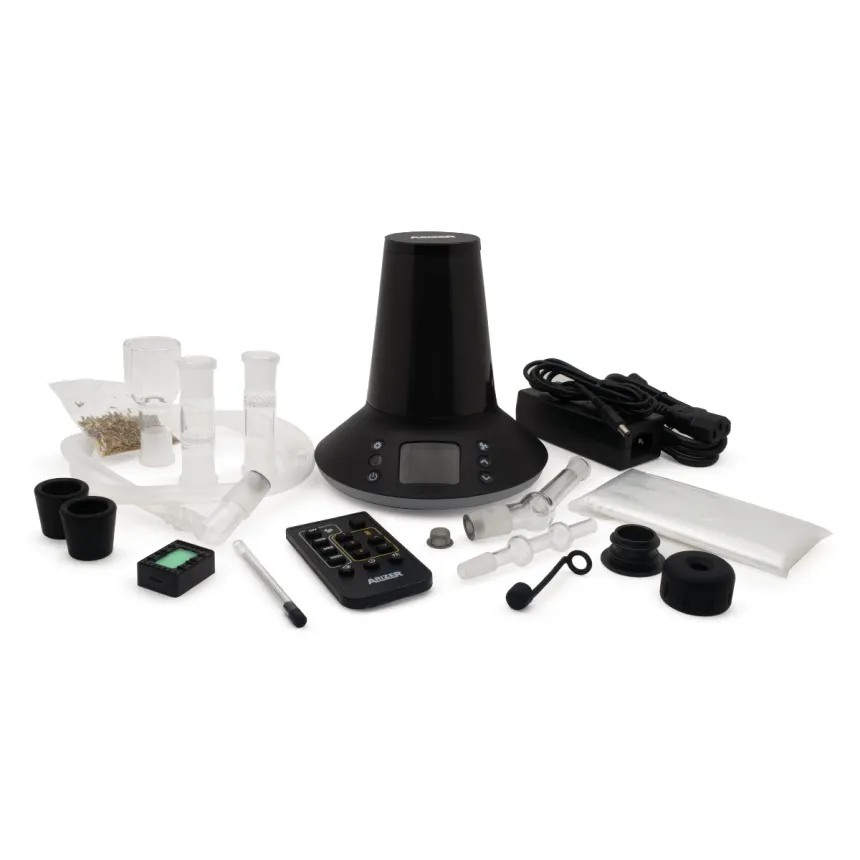
Heating technology plays a major role in the design of a dry herb vaporizer. The Arizer XQ2 uses an advanced ceramic convection heating system that passes heated air through the bowl.
Convection differs from a design that relies primarily on direct contact with a heated surface. As hot air moves through the material, it transfers heat throughout the bowl. Airflow, temperature selection and how you prepare the bowl all influence the result.
Arizer also highlights the XQ2’s isolated air path. This design separates the airflow path from the device’s internal electronics, which is an important consideration when comparing desktop vaporizers.
However, heating technology alone does not determine every aspect of performance. Bowl preparation, screen cleanliness, airflow and maintenance can all affect how the device operates.
For buyers comparing convection desktop vaporizers, the XQ2 offers a combination of adjustable heating, assisted airflow and multiple delivery options.
2. Digital Temperature Control and Custom Settings
Temperature control is another major feature of the Arizer XQ2. The device supports a range from 50°C to 260°C, allowing you to choose settings within the manufacturer’s specified operating range.
Its digital display shows the selected temperature in Celsius or Fahrenheit. You can also adjust the setting in one-degree Celsius or larger increments, depending on your preference.
Why does this matter? Different temperature settings produce different operating conditions, and users may prefer different settings for their own reasons. The XQ2 gives you room to experiment rather than limiting you to a small number of preset temperatures.
The device also offers customizable session settings, including an optional temperature alert, delayed start and automatic shut-off timer.
These features make the XQ2 more adaptable to different routines. For example, the timer can help you avoid leaving the unit running longer than intended, while the temperature alert provides a convenient notification when the device reaches a selected setting.
Nevertheless, follow the manufacturer’s operating instructions and never leave a heated appliance unattended.
3. Balloon Bag System: Flexible Desktop Use
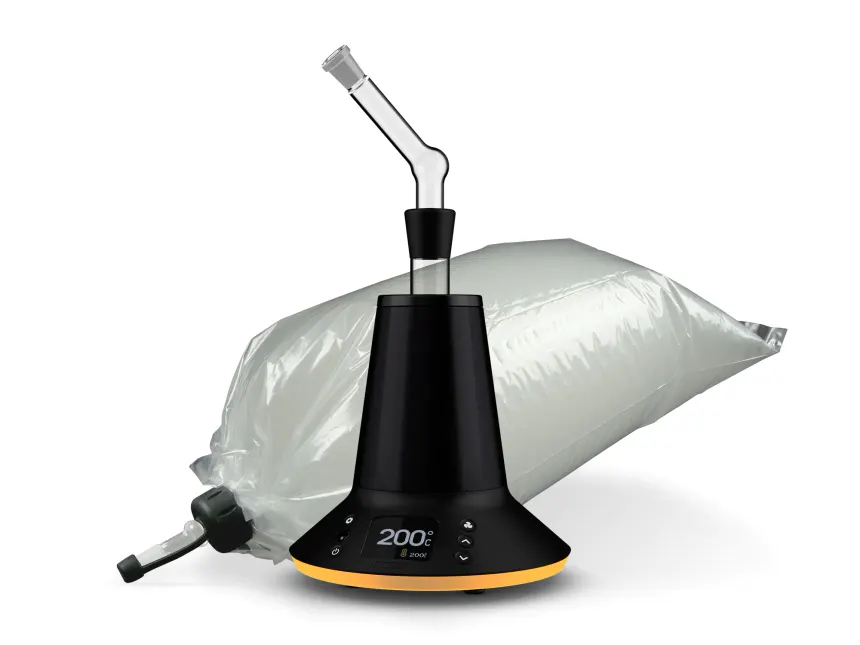
The balloon bag system is one of the most recognizable features of the Arizer XQ2. It allows the device to fill a compatible collection bag with vapor, which you can then disconnect and use with the appropriate mouthpiece.
This approach differs from drawing directly through a whip. Once the bag contains vapor, you can move around the room without remaining attached to the main unit.
For some buyers, that convenience is a deciding factor when comparing balloon-style desktop vaporizers.
The XQ2 package includes balloon-related accessories, such as a glass balloon mouthpiece, balloon connector and collection bags. The precise package should always be checked before purchase, particularly if you’re buying a replacement unit or an accessory bundle.
The balloon system also gives you an alternative to direct-draw use without requiring a separate desktop device.
If you’re searching for an Arizer XQ2 with balloon bags, check the product listing for the included components and replacement accessory options.
4. Whip Attachment for Direct Draws
Prefer a more connected desktop setup? The Arizer XQ2 also supports whip use.
The whip connects the glass bowl assembly to the mouthpiece through tubing. You can draw directly through the attachment or use the built-in fan to assist airflow.
This gives you another way to operate the device without filling a balloon first.
The XQ2 package includes a silicone whip and a glass mini whip. These accessories allow users to configure the device according to their preferences, although each component requires proper cleaning and careful handling.
The whip and balloon systems serve different purposes. A whip offers a direct connection to the device, while a balloon lets you collect vapor before disconnecting from the main unit.
Because the XQ2 supports both methods, buyers can experiment with the two systems before deciding which one they prefer.
5. Programmable Remote Control
The included remote control adds convenience to the Arizer XQ2 setup. Instead of reaching for the device every time you want to change a setting, you can manage key functions from the remote.
Arizer highlights customizable temperature presets and large remote buttons. These controls make it easier to access frequently used settings without navigating the main unit’s controls every time.
The remote works particularly well when you position the vaporizer on a desk or side table. You can keep the device in a stable location while adjusting settings from nearby.
It also helps distinguish the XQ2 from desktop models that require direct interaction with the main control panel for every adjustment.
If convenient controls are important to you, the remote is a useful feature to consider when comparing the XQ2 with other desktop vaporizers.
6. Three-Speed Fan and Airflow Management
The XQ2 includes a three-speed fan designed to support assisted-draw operation and balloon filling.
You can select a fan speed or turn the fan off, depending on the operating mode and your preference. This gives you more control over airflow than a device without an integrated fan.
Arizer also describes the fan as quiet and designed for improved airflow performance.
Keep in mind that the fan is a functional component, not a substitute for routine cleaning. Residue can build up on screens, bowls and attachments over time, so regular maintenance remains important.
If airflow changes noticeably, inspect the relevant parts and follow the manufacturer’s troubleshooting instructions before assuming the device has a mechanical problem.
7. Glass Components and Bowl Options
The Arizer XQ2 includes borosilicate glass components designed for its different operating modes. These components form an important part of the device’s overall setup.
The Connoisseur Bowl includes two chamber options identified by Arizer as the Cloud chamber and Flavor chamber. They provide different bowl capacities and positions relative to the heating element.
This gives users a choice between two configurations instead of relying on a single bowl design.
The package also includes Tuff BowlGrips, which help protect your hands when handling hot glass components.
Glass offers useful practical characteristics, but it still needs care. Avoid sudden temperature changes, inspect glass for cracks and let hot components cool before cleaning them.
For shoppers who prefer glass accessories and removable components, the XQ2 provides a useful balance of flexibility and maintainability.
8. Replaceable Air Intake Filter
The replaceable air intake filter is another feature worth considering when comparing the Arizer XQ2 with older desktop models.
A filter helps manage incoming air, while the isolated air path separates airflow from the device’s electronics. Arizer identifies both as notable elements of the XQ2’s design.
The filter is also replaceable, which gives owners a defined maintenance option rather than requiring them to treat the component as permanent.
Follow the manufacturer’s instructions for inspecting and replacing the filter. Do not operate the device with missing or incorrectly installed components if the manual requires them for normal operation.
For shoppers who compare technical features before purchasing, the filter and isolated air path are meaningful points to consider alongside temperature control and the available delivery systems.
9. Multicolor LEDs and User-Friendly Controls
The Arizer XQ2 features multicolor lighting on its base and heater area. You can select lighting options to personalize the appearance of your desktop setup.
The LEDs also provide visual feedback about the device’s operating state. Depending on the selected mode, the lights can indicate heating, temperature readiness and fan activity.
Meanwhile, the digital display provides temperature information and access to the unit’s controls.
These details may not be the main reason someone buys a vaporizer. Nevertheless, they contribute to the everyday user experience and help the XQ2 feel more configurable than a basic desktop appliance.
The key advantage is the combination of clear controls, status indicators and custom settings rather than lighting alone.
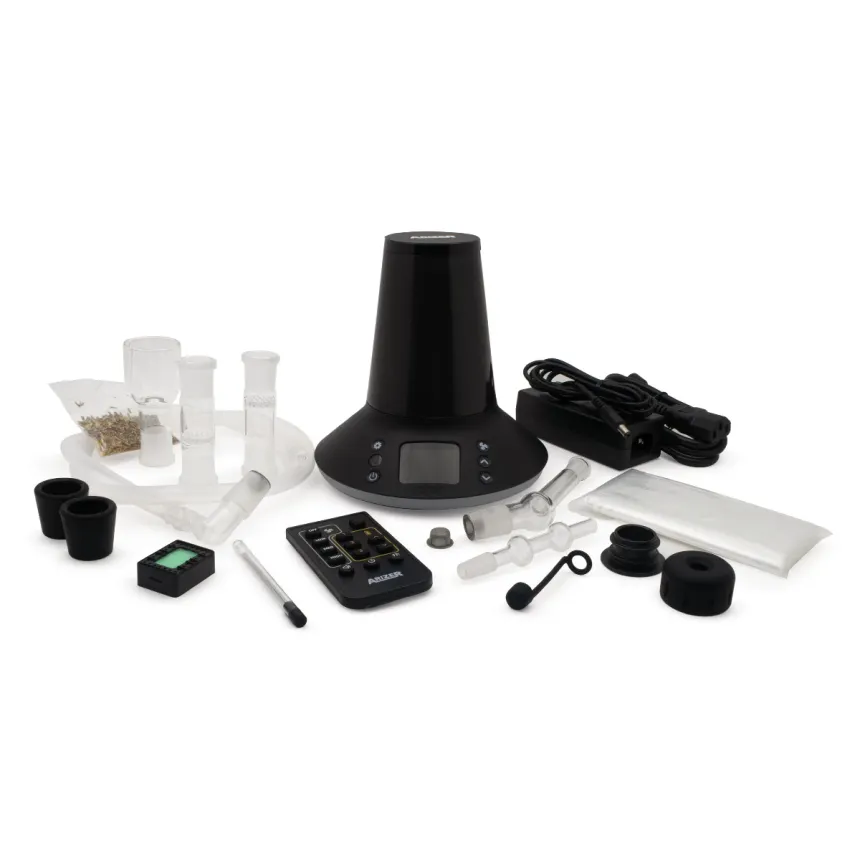
10. What Comes in the Arizer XQ2 Box?
The included accessories matter when evaluating the value of a desktop vaporizer. The manufacturer’s listed XQ2 package contains:
- Arizer XQ2 multi-purpose heater
- External power adapter
- Programmable remote control
- Two glass Connoisseur Bowls
- Two Tuff BowlGrips
- Glass aroma diffusion dish
- Silicone whip
- Glass mini whip
- Glass balloon mouthpiece
- Balloon connector
- Two balloon bags
- Air filter cartridge and filter
- Stainless steel stirring tool
- Spare screen pack
- Sample aromatic botanicals
- Owner’s manual
Package contents can change by region, retailer or bundle. Therefore, confirm the accessories listed on the page before placing an order.
The variety of included components allows you to explore the device’s supported modes without immediately buying a separate attachment for each one.
For replacement parts, use compatible components and consult the manufacturer’s documentation to avoid purchasing the wrong accessories.
11. Arizer XQ2 vs. Extreme Q: What Has Changed?
Many desktop vaporizer shoppers compare the Arizer XQ2 with the Arizer Extreme Q. Both models support balloon and whip systems, use ceramic convection heating and include remote controls.
However, the XQ2 adds several features that may influence a buying decision.
| Feature | Arizer XQ2 | Arizer Extreme Q |
|---|---|---|
| Heating system | Advanced convection | Pure convection |
| Isolated air path | Yes | No |
| Replaceable air intake filter | Yes | No |
| Temperature range | 50°C–260°C | 50°C–260°C |
| Approximate heat-up time | 90 seconds | 100 seconds |
| Balloon system | Yes | Yes |
| Whip system | Yes | Yes |
| Remote control | Yes | Yes |
| Three-speed fan | Yes | Yes |
| Multicolor LEDs | Yes | Blue base LEDs |
| Custom session settings | Yes | Yes |
These differences come from Arizer’s official desktop comparison chart. Actual performance depends on the setup and operating conditions. Compare Arizer desktop vaporizers.
The XQ2 is a logical option for buyers who want the newer design features. The Extreme Q, meanwhile, has a long history among desktop vaporizer users, although Arizer now lists it in its product vault.
If you’re upgrading from an Extreme Q, consider which updates matter to you rather than assuming a newer model automatically offers a worthwhile improvement for every user.
12. Is the Arizer XQ2 Worth the Price?
The value of the Arizer XQ2 depends on how much you will use its different features.
For example, buyers who want both balloon and whip delivery may appreciate having those options in one device. People who value precise temperature control may also find the digital interface and programmable remote useful.
On the other hand, a shopper who only needs a simple desktop vaporizer may not use every feature included in the XQ2.
When comparing prices, look beyond the initial purchase cost. Check which accessories come in the box, the availability of replacement parts, shipping costs and the retailer’s warranty and return policies.
Also, confirm the current price rather than relying on an older review or search result. Retailer promotions can change, and the manufacturer’s listed price may differ from a retailer’s offer.
Who should consider the Arizer XQ2?
The XQ2 is worth considering if you:
- Want a desktop vaporizer rather than a battery-powered portable device.
- Prefer a choice between whip and balloon delivery.
- Value digital temperature control.
- Want a programmable remote.
- Appreciate removable glass components.
- Prefer a device with a replaceable air intake filter.
- Want several operating modes in one unit.
However, if portability is your priority, a battery-powered model may be more suitable. The XQ2 requires a power connection and works best in a dedicated home setup.
13. Where to Buy the Arizer XQ2 Online
Once you’ve compared the features, the next step is to check the current price and availability.
Diamond Pearl Vapes has an Arizer XQ2 product listing, where you can review the product information and current purchase options.
Before ordering, check the following:
- Price: Confirm the displayed price and any applicable promotion.
- Stock: Make sure the selected configuration is available.
- Accessories: Review the included items and any optional extras.
- Power compatibility: Choose the correct plug configuration for your region.
- Shipping: Check delivery costs, destinations and estimated delivery times.
- Returns and warranty: Read the applicable terms before completing checkout.
Taking a moment to review these details helps you make a more informed purchase.
Shop the Arizer XQ2
If the XQ2 matches your requirements, you can review the current offer here:
Buy the Arizer XQ2 Desktop Vaporizer at Diamond Pearl Vapes
FAQ
What is the Arizer XQ2?
The Arizer XQ2 is a desktop dry herb vaporizer that uses advanced convection heating. It supports whip use, balloon bag collection and aroma diffusion.
What is the Arizer XQ2 temperature range?
The manufacturer lists a temperature range of 50°C to 260°C, equivalent to 122°F to 500°F. The display supports Celsius and Fahrenheit.
How long does the Arizer XQ2 take to heat up?
Arizer lists an approximate heat-up time of 90 seconds. Actual times may vary with the operating conditions and selected temperature.
Does the Arizer XQ2 include balloon bags?
Yes. The manufacturer’s standard package lists two balloon bags along with a balloon connector and glass mouthpiece. Check the retailer’s current listing to confirm package contents.
Can you use the Arizer XQ2 with a whip?
Yes. The device supports direct-draw and assisted-draw whip operation. The standard package includes a silicone whip and glass mini whip.
Is the Arizer XQ2 better than the Extreme Q?
The XQ2 adds an isolated air path, a replaceable air intake filter and multicolor LEDs. Both models support whip and balloon systems. The best choice depends on your budget and the features you value.
Is the Arizer XQ2 portable?
No. It is a desktop device that operates through an external power adapter. It is better suited to a stationary home setup than to use away from an outlet.
Is the Arizer XQ2 easy to clean?
The device includes removable glass parts and replaceable screens that support routine maintenance. Follow the manufacturer’s cleaning instructions and allow hot components to cool before handling them.
Where can I buy the Arizer XQ2?
You can view the current listing at Diamond Pearl Vapes. Check the product page for price, stock, shipping and purchase terms.
Final Verdict: Should You Buy the Arizer XQ2?
The Arizer XQ2 combines several useful desktop vaporizer features in one package. Its advanced convection heating, digital temperature control, programmable remote, three-speed fan and replaceable air intake filter make it worth comparing with other desktop models.
Its biggest advantage is versatility. The XQ2 supports both whip and balloon delivery, while its glass accessories and custom settings give users several ways to configure the device.
Nevertheless, it is not the ideal choice for everyone. The XQ2 requires an external power connection, takes up space on a stable surface and includes components that need routine cleaning and careful handling.
If you want a flexible desktop vaporizer and expect to use its different operating modes, the Arizer XQ2 deserves a place on your shortlist.
Ready to compare the current price? Visit Diamond Pearl Vapes’ Arizer XQ2 product page to review the latest listing and make an informed buying decision.
References
- Arizer XQ2 — Official product information
- Arizer XQ2 vs. Extreme Q — Manufacturer comparison.
- Arizer Desktop Vaporizer Comparison Chart.
Product specifications and package contents should be verified against the manufacturer’s current documentation. Prices, promotions and availability can change.