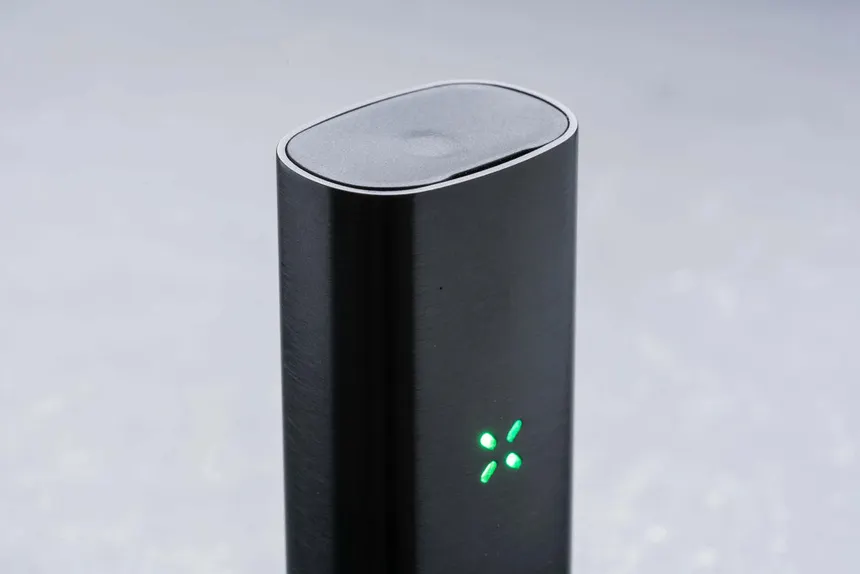
Regular cleaning plays an important role in maintaining a PAX vaporizer. Over time, material residue can collect around the oven, screen, mouthpiece, and air path. As residue builds up, it can affect airflow, make cleaning more difficult, and interfere with normal operation.
Fortunately, you do not need complicated equipment to maintain your device. A few basic cleaning supplies and a consistent maintenance routine can help keep your PAX vaporizer in good working condition.
Whether you own a PAX Mini, PAX Plus, PAX Four, PAX Flow, or an older model, this guide explains how to clean the main components, prevent residue buildup, and identify common maintenance problems.
Always check the cleaning instructions for your exact model before starting. Different PAX vaporizers may use different components and cleaning procedures.
Why Cleaning Your PAX Vaporizer Matters
A portable vaporizer contains several components that need regular attention. The oven, screen, mouthpiece, and air path can collect residue during normal use.
If you leave this residue in place, you may notice several problems:
- Restricted airflow: Residue can collect around the screen and air path.
- Difficult mouthpiece movement: Buildup may make removable mouthpieces harder to clean or operate.
- Unpleasant residue or odours: Old material can remain on internal surfaces.
- More difficult maintenance: Heavy buildup often takes longer to remove than fresh residue.
- Inconsistent operation: Blocked or dirty components may interfere with normal airflow and device operation.
Regular maintenance helps prevent these issues. It also makes each cleaning session easier because you can remove residue before it becomes difficult to manage.
1. Cleaning Supplies You Should Prepare
Before cleaning your PAX vaporizer, gather the appropriate supplies.
| Cleaning item | Purpose |
|---|---|
| Isopropyl alcohol | Cleaning compatible removable components |
| Cotton swabs | Removing residue from accessible surfaces |
| Pipe cleaners | Cleaning compatible air-path areas |
| Soft cleaning brush | Removing loose material |
| Lint-free cloth | Wiping the exterior |
| Small container | Holding removable components during cleaning |
Use only cleaning products that the manufacturer recommends for your model.
Important: Never pour alcohol or cleaning liquid into the device. Do not soak the electronic body, battery section, or any component that the manufacturer identifies as non-washable. Keep liquids away from charging contacts and electronic openings.
2. How to Clean a PAX Vaporizer Step by Step
The exact cleaning procedure depends on the model. However, the following general process provides a useful starting point.
Step 1: Turn Off and Cool the Device
First, switch off your PAX vaporizer and allow it to cool completely.
Never clean a hot device. A cool device is easier to handle and reduces the risk of burns or accidental damage.
If the device has been charging, disconnect it from the charger before cleaning.
Step 2: Remove the Mouthpiece
Remove the mouthpiece according to the instructions for your model.
Inspect the mouthpiece for visible residue. If the manufacturer permits alcohol cleaning, use a cotton swab lightly dampened with isopropyl alcohol to clean compatible surfaces.
Do not force the mouthpiece out if it feels stuck. Instead, follow the model-specific removal instructions.
Allow the component to dry completely before reinstalling it.
Step 3: Clean the Oven
The oven is the chamber that holds the dry material. Residue can collect around its edges and interior surfaces.
Follow these steps:
- Make sure the device has cooled completely.
- Remove loose material using the recommended cleaning tool.
- Use a soft brush to remove remaining particles.
- Clean accessible residue with a suitable dry or lightly dampened cleaning tool, following PAX’s instructions.
- Avoid scratching the oven surface.
- Allow the chamber to dry before using the device again.
Do not flood the oven with alcohol or another liquid. A small amount of cleaning solution on a compatible tool is different from pouring liquid into the chamber.
Step 4: Inspect and Clean the Screen
The oven screen helps separate loose material from the air path. Over time, small particles may collect around it.
Check whether your PAX model has a removable screen and follow its removal instructions.
If the manufacturer allows alcohol cleaning, clean the removable screen separately. Use a soft brush or compatible cleaning tool to remove remaining particles.
Never force a screen into or out of position. A damaged or incorrectly installed screen can affect normal operation.
Step 5: Clean the Air Path
The air path carries air through the device toward the mouthpiece. Residue can collect inside this area and restrict airflow.
Use the cleaning tool supplied with your device, or another tool approved by PAX for the specific model.
Move the tool gently through the accessible air path. Avoid using excessive force because internal components can be damaged.
Some PAX models have different air-path designs. Therefore, do not assume that a cleaning method for an older device also applies to the PAX Flow or PAX Four.
Step 6: Wipe the Exterior
Use a soft, lint-free cloth to remove fingerprints, dust, and surface marks.
Avoid spraying cleaning products directly onto the device. Instead, apply any approved cleaning solution to the cloth when the manufacturer permits it.
Pay particular attention to the area around the charging contacts. Keep this area clean and dry.
Step 7: Allow Every Component to Dry
Before reassembling your vaporizer, make sure all cleaned components have dried completely.
Alcohol vapour and remaining cleaning liquid should not be present when you switch on or heat the device.
Once everything is dry, reinstall the components according to the manufacturer’s instructions.
3. How Often Should You Clean Your PAX Vaporizer?
Cleaning frequency depends on how often you use your device and the amount of residue it collects.
A simple maintenance schedule can help you stay consistent.
| Maintenance task | Suggested frequency |
|---|---|
| Remove loose material | After each use |
| Inspect the mouthpiece | Regularly |
| Check the oven and screen | Every few sessions |
| Clean accessible air-path areas | When residue begins to collect |
| Perform a more thorough cleaning | As recommended for your model |
| Inspect charging contacts | Periodically |
These are general maintenance suggestions, not official cleaning intervals for every PAX model. Follow the manufacturer’s schedule if it differs.
The main goal is to avoid allowing residue to build up for long periods.
4. Model-Specific PAX Cleaning Considerations
PAX has released several portable vaporizers over the years. Although they share a similar design philosophy, their components and cleaning requirements can differ.
PAX Mini
<PRIVATE_PERSON> The PAX Mini has a compact design and a straightforward component layout. Focus on keeping the oven, mouthpiece, and accessible air path free from residue.
Because the device has a small form factor, regular inspection can help you identify buildup before it becomes difficult to remove.
PAX Plus
The PAX Plus uses a familiar PAX design with additional operating modes. Its maintenance routine should follow the same basic principles: clean compatible removable components, inspect the oven, and keep the air path clear.
Check the official instructions before removing or cleaning individual components.
PAX Four
The PAX Four has its own component and airflow design. Use the cleaning accessories and instructions intended for this model.
Do not assume that older PAX cleaning tools or removal procedures are fully compatible.
PAX Flow
The PAX Flow has a different airflow-focused design from older PAX devices. This makes it especially important to follow the model-specific cleaning instructions.
Avoid pushing cleaning tools into areas that the manufacturer does not identify as serviceable. Use only the recommended method for accessible components.
Older PAX Models
Older models may use different mouthpiece, screen, and charging arrangements.
If you own an older PAX vaporizer, look for the manual that matches its exact model. This helps prevent damage caused by using the wrong cleaning method.
5. How to Maximize Performance on Your PAX Vaporizer
Cleaning is only one part of device maintenance. Your everyday habits can also affect how well your vaporizer operates.
Here are several practical ways to maintain normal device performance.
Keep the Oven Clean
Residue can accumulate around the oven after repeated use. Remove loose particles regularly and clean the chamber according to the manufacturer’s instructions.
A clean oven also makes it easier to inspect the chamber for visible damage or unusual residue.
Avoid Overfilling
Follow the loading instructions for your specific PAX model.
Overfilling can interfere with the intended airflow and make cleaning more difficult. Use the loading amount and technique recommended by PAX rather than packing the chamber beyond its intended capacity.
Use Suitable Material
Only use material that the manufacturer identifies as compatible with your device.
Do not put liquids, oils, concentrates, or other substances into a chamber designed for dry material unless the manufacturer specifically supports that use and provides the correct accessory.
Check the Mouthpiece
Inspect the mouthpiece regularly for residue and visible damage.
A clean, correctly installed mouthpiece helps maintain the device’s intended airflow. If a component becomes damaged, replace it with a compatible part rather than trying to repair it with glue or other household products.
Follow the Recommended Temperature Settings
Different models offer different temperature controls and operating modes.
Use the manufacturer’s recommended settings and instructions for your device. Avoid assuming that one model’s temperature range or operating method applies to another.
Keep Firmware and Product Information Updated
If your PAX model supports software or firmware updates, check the manufacturer’s official guidance.
Use official update instructions and avoid unofficial software or modifications. Not every model supports the same update features.
Store the Device Properly
Store your PAX vaporizer in a clean, dry place when you are not using it.
Keep it away from excessive heat, moisture, direct sunlight, and areas where it may be knocked over. Also, avoid storing the device with loose material inside the oven for extended periods.
6. Battery Care and Charging Tips
Battery maintenance is another important part of long-term ownership.
Most PAX portable vaporizers use integrated rechargeable batteries. However, charging methods and specifications vary by model.
Use these general battery-care practices:
- Use the charger or cable recommended for your model.
- Keep charging contacts clean and dry.
- Avoid exposing the device to extreme temperatures.
- Do not charge a visibly damaged device.
- Disconnect the charger when charging is complete, following the manufacturer’s instructions.
- Store the device according to the recommended battery-storage guidance.
- Stop using the device if the battery becomes unusually hot, swollen, or damaged.
Do not attempt to open the battery compartment or replace an internal battery unless PAX specifically provides instructions for that procedure.
If your vaporizer no longer holds a charge, check the manufacturer’s troubleshooting guidance or contact an authorised service provider.
7. Common PAX Vaporizer Problems and Maintenance Solutions
A few common problems can affect portable vaporizers. Some relate to residue, while others may indicate a charging or component issue.
| Problem | Possible reason | What to check |
|---|---|---|
| Restricted airflow | Residue in the screen or air path | Inspect and clean compatible components |
| Mouthpiece feels stuck | Residue buildup | Follow the approved removal procedure |
| Device does not charge | Cable, contact, or battery issue | Check the charging setup and official instructions |
| Device does not heat | Low battery or device fault | Charge as directed and consult troubleshooting guidance |
| Unusual odour | Residue or contamination | Inspect and clean compatible parts |
| Device behaves inconsistently | Component, battery, or electronic issue | Check the manual or contact support |
Why Is My PAX Vaporizer Not Producing Normal Airflow?
Residue around the oven screen, mouthpiece, or air path may restrict airflow.
First, switch off the device and allow it to cool. Then inspect the accessible components and clean them according to the manufacturer’s instructions.
If airflow remains restricted, do not force a tool through the device. Contact PAX support or an authorised service provider.
Why Is My PAX Mouthpiece Difficult to Remove?
Residue can collect around removable components and make them harder to handle.
Avoid using sharp tools or excessive force. Follow the correct removal instructions for your model. If the component remains stuck, seek manufacturer support.
Why Is My PAX Vaporizer Not Charging?
Check that you are using the correct charger or cable for your model. Inspect the charging contacts for visible dirt or damage, and make sure the device remains dry.
If the device still does not charge, consult the manufacturer’s troubleshooting instructions. A battery or electronic fault may require professional assistance.
8. Cleaning Mistakes to Avoid
Incorrect cleaning can damage a vaporizer. Even simple maintenance requires care.
Avoid these common mistakes:
1. Soaking the electronic body
Never submerge the main device in alcohol or water. Liquids can damage the electronics and battery.
2. Pouring alcohol into the oven
Use only the cleaning method approved for your model. Never flood the chamber or internal air path.
3. Using sharp metal objects
Knives, needles, and other sharp tools can scratch or damage internal surfaces.
4. Cleaning the device while it is hot
Always switch it off and let it cool before removing components or cleaning the oven.
5. Reassembling wet components
Allow every cleaned part to dry completely before putting the device back together.
6. Using incompatible replacement parts
A component that fits poorly may interfere with airflow or normal operation. Choose replacement parts designed for your exact model.
7. Ignoring manufacturer instructions
PAX models do not all share identical components. Always use the manual for your particular device.
9. When Should You Replace PAX Accessories?
Cleaning can remove residue, but it cannot repair damaged components.
Inspect your accessories periodically and replace them when they show signs of wear or damage.
You may need a replacement when:
- A mouthpiece develops cracks.
- A screen becomes damaged or deformed.
- A component no longer fits securely.
- A cleaning accessory becomes worn or ineffective.
- An approved replacement part is recommended by the manufacturer.
Always check model compatibility before purchasing replacement accessories. A part designed for one PAX model may not fit another.
10. Final Thoughts: Keep Your PAX Vaporizer Clean and Well Maintained
A consistent maintenance routine can make PAX ownership easier. Remove loose material regularly, inspect the oven and mouthpiece, clean compatible components, and keep the air path free from unnecessary residue.
Battery care and proper storage also matter. Use the recommended charging equipment, keep the device dry, and follow the manufacturer’s operating instructions.
Most importantly, remember that PAX models have different designs. The correct cleaning method for a PAX Mini may not apply to a PAX Flow or PAX Four.
By following the instructions for your exact device, you can maintain its components, avoid common cleaning mistakes, and keep it in good working condition.
FAQ
How often should I clean my PAX vaporizer?
Remove loose material after each use and inspect the oven, mouthpiece, and air path regularly. Perform a more thorough cleaning according to the manufacturer’s instructions and your device’s cleaning needs.
Can I use isopropyl alcohol to clean a PAX vaporizer?
PAX permits alcohol cleaning for certain compatible components, but you should check your model’s instructions first. Never pour alcohol into the electronic body, oven, or internal air path unless the manufacturer specifically instructs you to do so.
Can I wash my PAX vaporizer with water?
Do not wash or submerge the complete device. Some removable components may have specific cleaning instructions, so check the official manual before using water on any part.
Why does my PAX vaporizer have restricted airflow?
Residue may collect around the screen, mouthpiece, or air path. Switch off the device, let it cool, and clean accessible components using the approved method.
Can I use cotton swabs to clean my PAX?
Yes, cotton swabs can help clean compatible accessible surfaces. Use them gently and avoid leaving fibres inside the device.
How do I keep my PAX battery in good condition?
Use the recommended charging equipment, keep the contacts clean and dry, and avoid extreme temperatures. Follow the manufacturer’s battery-storage and charging instructions.
Can I use the same cleaning method for every PAX model?
No. PAX models have different components and designs. Always follow the instructions for your exact model.
When should I replace my PAX mouthpiece or screen?
Replace a component if it becomes damaged, deformed, or no longer fits correctly. Use a compatible replacement intended for your model.
References and Official Support
For model-specific instructions and replacement accessories, consult the manufacturer’s resources: